.png)

Blog: Art-Kubed
Announcing Operant's Coverage for Microsoft Copilot and Every AI Assistant Embedded in Microsoft 365
Microsoft 365 is becoming one of the largest enterprise AI surfaces—but securing it requires more than monitoring a chat window. Copilot, custom agents, and third-party assistants can access sensitive data across Word, Excel, Outlook, Teams, SharePoint, and Graph. Operant brings detection and enforcement across this entire layer, combining Copilot observability through Microsoft Purview, inline protection for Microsoft 365 Agents SDK agents, and prompt- and label-aware controls for embedded assistants.
For most enterprises, the largest AI footprint isn't a coding agent or a chat window. It's Microsoft 365. Copilot sits in Word, Excel, PowerPoint, Outlook, and Teams. Custom agents built on the Microsoft 365 Agents SDK run against SharePoint and Graph. Third-party assistants such as Harvey and Rogo ship as add-ins that read whatever document the user has open. None of these looks like an AI tool from a security team's perspective. Each one is a panel next to the work, with the user's delegated access to the tenant.
Today we're announcing three expansions that bring Operant's detections and enforcement to that whole layer:
- Copilot observability and detections through a Microsoft Purview integration. Operant ingests Copilot prompts, responses, and tool calls across every Copilot surface, including the Copilots embedded in Microsoft 365 apps, and runs the full Operant detection set against them.
- Inline defense for the Microsoft 365 Agents SDK. Agent Protector goes inside the agent loop of custom Copilot agents, so each step is evaluated before it executes.
- Prompt-level and label-aware controls for embedded assistants. For third-party assistants embedded in Microsoft 365 on the web, such as Harvey and Rogo, Operant observes each prompt, runs detections, and blocks individual prompts that violate policy. It can also block an entire plugin based on the sensitivity labels your organization already applies in Microsoft 365 and Purview.
Why Microsoft 365 is a different problem
Very little Copilot activity has a local process you can instrument. The prompt is authored in an Office client, grounded against Graph in Microsoft's cloud, and answered with content pulled from mailboxes, SharePoint sites, and Teams chats the user never opened in that session.
Four things make this surface distinct:
- Grounding is the data flow. Copilot doesn't wait for a user to paste something sensitive. It retrieves it. A prompt like "summarize what's happening with the acquisition" can pull in every document the user can reach that mentions it.
- There are many Copilots. Copilot in Word, Copilot in Teams, Microsoft 365 Copilot Chat, Copilot agents built in Copilot Studio, and agents built on the Agents SDK each have their own entry point. They share an identity model and a data estate. They don't share a single enforcement point.
- The assistant market inside Office is multi-vendor. Legal teams run Harvey in Word. Finance teams run Rogo against models and decks. Each vendor brings its own model, its own retention terms, and its own view of what "in context" means.
- Organizations have already classified their data. Unlike most AI surfaces, Microsoft 365 arrives with years of investment in sensitivity labels. That is the most useful signal a security team has, and it is mostly unused for AI governance today.
Copilot observability and detections, via Purview
Microsoft Purview already records Copilot interactions for audit and compliance. Operant's Purview integration consumes that interaction record and turns it into security telemetry: every prompt, every response, and every plugin, connector, or agent action Copilot took, attributed to the user, the app surface, and the resources that were referenced.
Operant then applies the same detection set we run on every other agent surface:
- Sensitive data exposure. PII, PHI, PCI, credentials, source code, and MNPI appearing in prompts, grounded content, or responses.
- Prompt injection, direct and indirect. Including instructions hidden in emails and documents that Copilot retrieved while grounding.
- Oversharing through grounding. Responses that cite content from sites or files well outside the user's normal working set, which is often the first sign that permissions are broader than anyone intended.
- Anomalous agent and tool activity. Unusual plugin invocations, spikes in retrieval volume, and agents acting outside their declared purpose.
- Jailbreak and policy evasion attempts, correlated across sessions and users rather than evaluated one prompt at a time.
It's worth being precise about what this layer is. The Purview integration is an observability and detection path. It sees every Copilot surface, including the embedded ones that have no other hook, and it gives you one audit trail across all of them. It doesn't sit inline on Microsoft's inference path, so on its own it detects, alerts, and drives response rather than stopping a prompt before the model sees it. Inline blocking comes from the next two layers, wherever the architecture gives us a place to stand.
In practice
A sales director asks Copilot in Outlook to draft a reply to a customer about renewal pricing. To ground the draft, Copilot retrieves a SharePoint workbook from the finance site containing margin targets for every enterprise account. The director has access to that site through an old project group and has never opened the file.
Nothing was pasted and nothing was uploaded. The draft that comes back cites the workbook.
Operant sees the interaction in the Purview stream, matches the grounded content against the organization's MNPI and financial data policies, and flags that the response drew on a file far outside the director's usual access pattern. The security team gets an alert naming the user, the Copilot surface, the file, and the site permission that made it reachable. The fix is to remove a stale group membership, and the evidence to justify it is already attached.
Inline defense for the Microsoft 365 Agents SDK
Custom agents are where Copilot stops answering questions and starts acting. Agents built on the Microsoft 365 Agents SDK plan, call tools, reach external APIs and MCP servers, and write back into the tenant. A prompt-and-response view of those agents shows the beginning and end of the story, with the plot missing. That middle is where indirect prompt injection and tool misuse show up.
So for agents your teams build, Operant goes inside the loop. Agent Protector integrates into the Agents SDK runtime and evaluates each step as it happens:
- Every tool invocation, with its arguments and its result, checked against policy before the result returns to the model.
- Retrieved content, inspected for indirect prompt injection before it enters the agent's context.
- Outbound calls, checked against allowed destinations to catch exfiltration.
- Write actions such as sending mail, creating files, or updating records, gated by policy rather than assumed safe because the user was entitled to them.
- Loop behavior: iteration counts, retries, and sudden changes in plan, which are often the first signal that an agent has been redirected.
Because Agent Protector runs inside the loop, it isn't limited to a yes or no on the whole request. It can redact a field from a tool result, block a single outbound call, or stop one write action while the rest of the task completes.
Prompt-level and label-aware controls for embedded assistants
This is the control security teams have been asking for since the first third-party assistant appeared in the Office ribbon.
Harvey, Rogo, and the growing list of vertical assistants are valuable because they read the document in front of the user. That is also what makes them hard to govern. A legal assistant in Word will read a draft contract, and it will read a board memo in the same window. A finance assistant that is appropriate for a public comps model is not appropriate for a deal model covered by an information barrier.
Most organizations have already expressed this distinction. It lives in their sensitivity labels: Public, General, Confidential, Highly Confidential, and the custom labels that map to specific deals, matters, and regulatory regimes.
Operant governs these assistants at two levels.
Prompt-level observation, detection, and blocking
For assistants embedded in Microsoft 365 on the web, Operant sees each prompt as the user sends it, along with the document context the assistant is working from. Every prompt runs through the same detections as Copilot: sensitive data exposure, direct and indirect prompt injection, jailbreak attempts, and policy evasion.
When a prompt violates policy, Operant blocks that prompt, not the whole tool. A user who asks Harvey to paste a client's account numbers into a draft is stopped on that request, told which policy fired, and can keep using Harvey for the rest of the review. Security teams get a per-prompt audit trail for each third-party assistant, in the same place as their Copilot activity.
Label-aware plugin blocking
Some content shouldn't reach a given vendor at all, however the prompt is phrased. For that, Operant uses sensitivity labels as policy. Security teams can define rules such as:
- Block Harvey entirely on any document labeled Highly Confidential – Board.
- Allow Rogo on General and Confidential financial models, and block it on anything labeled MNPI – Restricted.
- Allow Copilot on a label, while blocking any third-party assistant that isn't on the approved vendor list.
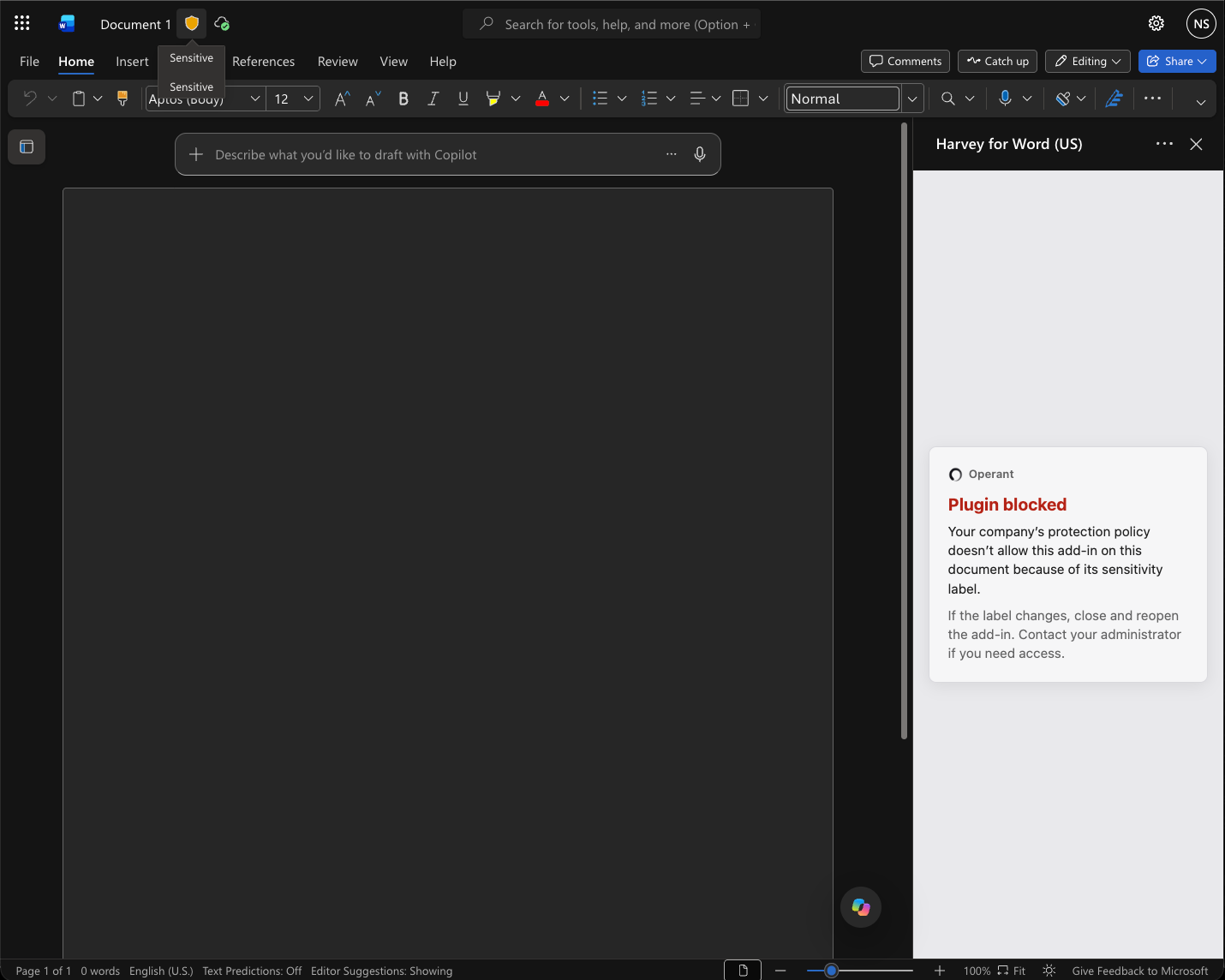
When a label rule fires, the plugin is blocked for that content, and the user is told which organizational policy applied. There's no new classification scheme to build and no content to re-tag. The labels your data governance team already maintains become the boundary for which AI vendors can see which data.
In practice
An associate on a deal team opens a merger agreement in Word and invokes a third-party legal assistant to redline the indemnification clause. The document carries a Project Atlas – Restricted label, which the firm applies to matters behind an ethical wall.
The assistant never receives the document. Operant evaluates the label, matches it to the policy that restricts that matter to approved, firm-hosted models, and blocks the plugin. The associate sees the policy name and is pointed to the approved alternative. The same assistant keeps working on unrestricted documents in the next tab.
What this means for security teams
One policy set across every assistant in Microsoft 365. Copilot, custom Copilot agents, and third-party add-ins are governed by the same classification rules, the same detections, and the same audit trail, even though each reaches the data through a different path.
Your existing labels become AI controls. The investment already made in Purview sensitivity labeling now decides which assistants can see which content.
Coverage matches each surface's architecture. Purview gives you visibility and detection everywhere Copilot runs. Agent Protector gives you step-level inline enforcement for the agents you build. For embedded assistants like Harvey and Rogo, prompt-level detection and blocking handles individual requests, and label-aware blocking gives you vendor-level control over sensitive content. We tell you which control applies where, rather than implying one mechanism covers everything.
Getting started
Start with discovery. Connect Operant to Purview and let it inventory every Copilot surface, custom agent, plugin, and third-party assistant in use across your tenant. That inventory is almost always larger than teams expect.
From there, we recommend the same rollout we use everywhere: run policies in detect-only mode for a week, tune them against real traffic, then enable prompt-level blocking, label-aware plugin rules, and inline agent enforcement, starting with your most sensitive labels.
Existing Operant customers can enable the Purview integration, embedded assistant controls, and label-aware policies from the Operant console. Agent Protector for the Microsoft 365 Agents SDK installs as a package in your agent project and binds to the same policy set.
Using Claude for Microsoft 365? See how Operant covers it in our Claude announcement.